|
|
 |
Getting Started with AIFF MP3 Converter
|
AIFF MP3 Converter converts between AIFF to MP3 and MP3
to AIFF. AIFF files generally end with a .aif, .aiff, .aifc,
or .afc extension. The software also supports batch conversion.
- Choose Files
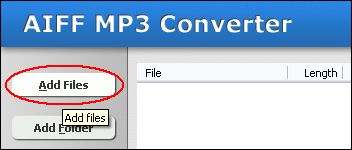
Click "Add Files" button to choose files and add them to conversion
list.
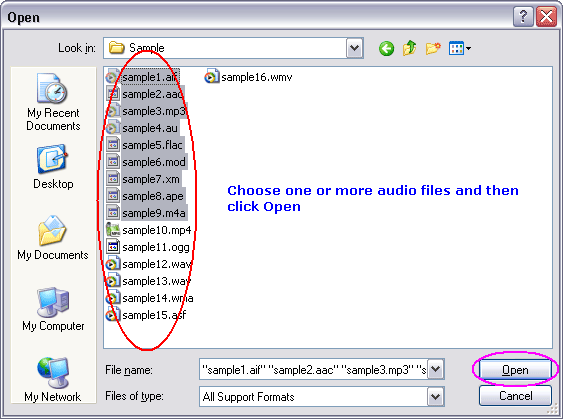
Choose one or more files you want to convert and then click Open.
- Choose Target File Format
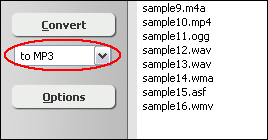
You can choose one of the following formats
- to AAC
- to AC3
- to AIFF
- to ALAC (Apple Lossless)
- to AMR
- to AU
- to CAF
- to DTS
- to FLAC
- to M4A (MPEG-4 audio)
- to M4B (MPEG-4 audiobook)
- to M4R (iPhone ringtone)
- to MKA
- to MMF
- to MP2
- to MP3
- to MP4 (audio track)
- to MPA
- to OGG
- to WAV
- to WMA
- Convert
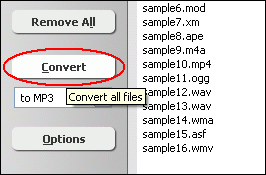
Click button "Convert" to convert all files into target format.
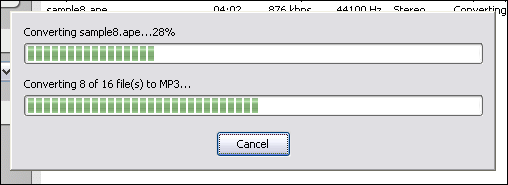
The software is converting files.
- Play & Browse
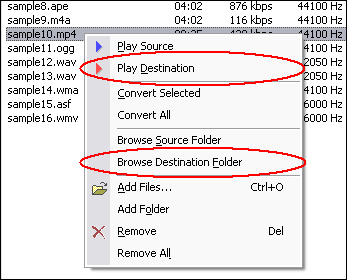
When conversion completes, you can right-click converted item and choose "Play
Destination" to play the destination file; or choose "Browse Destination
Folder" to open Windows Explorer to browse the destination file.
Top
What is AIFF?
Audio Interchange File Format (AIFF) is an audio file format standard used for
storing sound data for personal computers and other electronic audio devices.
The format was co-developed by Apple Computer in 1988 based on Electronic Arts'
Interchange File Format (IFF, widely used on Amiga systems) and is most commonly
used on Apple Macintosh computer systems. AIFF is also used by Silicon Graphics
Incorporated. The audio data in a standard AIFF file is uncompressed big-endian
pulse-code modulation (PCM). There is also a compressed variant of AIFF known
as AIFF-C or AIFC, with various defined compression codecs.
Standard AIFF is a leading format (along with SDII and WAV) used by professional-level
audio and video applications, and unlike the better-known lossy MP3 format, it
is non-compressed (which aids rapid streaming of multiple audio files from disk
to the application), and lossless. Like any non-compressed, lossless format, it
uses much more disk space than MP3¡ªabout 10MB for one minute of stereo
audio at a sample rate of 44.1 kHz and a sample size of 16 bits. In addition to
audio data, AIFF can include loop point data and the musical note of a sample,
for use by hardware samplers and musical applications.
The file extension for the standard AIFF format is .aiff or .aif. For the compressed
variants it is supposed to be .aifc, but .aiff or .aif are accepted as well by
audio applications supporting the format.
What is MP3?
MPEG-1 Audio Layer 3, more commonly referred to as MP3, is a digital audio encoding
format using a form of lossy data compression. It is a common audio format for
consumer audio storage, as well as a de facto standard encoding for the transfer
and playback of music on digital audio players. MP3's use of a lossy compression
algorithm is designed to greatly reduce the amount of data required to represent
the audio recording and still sound like a faithful reproduction of the original
uncompressed audio for most listeners, but is not considered high fidelity audio
by audiophiles. An MP3 file that is created using the mid-range bit rate setting
of 128 kbit/s will result in a file that is typically about 1/10th the size of
the CD file created from the original audio source. An MP3 file can also be constructed
at higher or lower bit rates, with higher or lower resulting quality. The compression
works by reducing accuracy of certain parts of sound that are deemed beyond the
auditory resolution ability of most people. This method is commonly referred to
as perceptual coding. It internally provides a representation of sound within
a short term time/frequency analysis window, by using psychoacoustic models to
discard or reduce precision of components less audible to human hearing, and recording
the remaining information in an efficient manner. This is relatively similar to
the principles used by JPEG, an image compression format.
Related Topics: AIFF to WAV,
AIFF to WMA, AIFF
to OGG, AIFF to AAC, AIFF
to AMR, AIFF to M4A, AIFF
to M4B, AIFF to MP4, AIFC
to MP3, AIFC to MP4, AIFC
to WAV, AIFC to WMA, AIFC
to OGG, AIFC to AAC, AIFC
to AMR, AIFC to M4A, AIFC
to M4B
|



