| Net Meter |
- Version: 3.6 build 437
- Size: 1.16 MB
- OS: Windows 10 / 8 / 7 / Vista / 2008 / XP / 2003 / 2000 / NT / Me / 98
(both 32-bit and 64-bit editions compatible)
- Free Trial Period: 30-day
|
|
 |
Net Meter
|
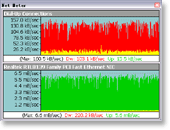 Net Meter
monitors network traffic through all network connections on the computer it's
installed on, and displays real-time graphical and numerical downloading and uploading
speeds. The software supports to display transfer rates of multiple network
connections at the same time. It also logs network traffic and provides
daily, weekly, monthly, and summary traffic reports. And start days
of week and month are customizable. The program allows you to setup a notification
to get an alert when you exceed a certain amount of bandwidth usage. And, traffic
stopwatch enables you to test bandwidth speed of connections. You
can also record transfer rates of connections in plain text or Microsoft
Excel CSV format. Net Meter
monitors network traffic through all network connections on the computer it's
installed on, and displays real-time graphical and numerical downloading and uploading
speeds. The software supports to display transfer rates of multiple network
connections at the same time. It also logs network traffic and provides
daily, weekly, monthly, and summary traffic reports. And start days
of week and month are customizable. The program allows you to setup a notification
to get an alert when you exceed a certain amount of bandwidth usage. And, traffic
stopwatch enables you to test bandwidth speed of connections. You
can also record transfer rates of connections in plain text or Microsoft
Excel CSV format.
Net Meter supports running as a system service that monitors
bandwidth usages and generate traffic reports automatically without log on.
Net Meter works with the majority network connections
including phone modems, DSL, cable modem, LAN, satellite, wireless, VPN and more.
The software is full compatible with Windows 98, Windows Me, Windows NT, Windows
2000, Windows XP, Windows 2003, Vista, Windows 7, Windows 8, and Windows 10.

WAN
Net Meter and LAN Net Meter! Try It Now!
 Free Download Net Meter
Top 11 Benefits of Net Meter
- Show real-time downloading and uploading speeds
Net Meter monitors traffic of all network connections
and displays real-time graphical and numerical
data transfer rates. You can see your real-time download and upload rates. You
can know how efficient your Internet connection is.
- Show bandwidth consumption at any moment
It's very useful if you've been the victim of Spyware
or an unauthorized program is accessing network resources.
- View transfer rates of multiple network connections at the same time
The software supports to show transfer rates for multiple connections
at the same time. You can view WAN and LAN transfer rates at a time.
- Bandwidth usage notification
The software allows you to setup a notification
to get an alert when you exceed a certain amount of bandwidth usage.
- Traffic reports
Net Meter logs network traffic and provides daily,
weekly, monthly, and summary traffic reports. It's easy to know how many
bytes have been downloaded and uploaded every day / week / month. It's also possible
to specify start day of month and week to fit your billing cycle.
- Run as a system service
A system service can be run without log on. The service is able
to monitor bandwidth usage, record rates, and generate traffic report in txt,
csv, and html formats every N seconds. You can export a traffic report in html
file to your web directory, and then browse the file to view bandwidth usage anywhere
and anytime.
- Start day of month and week
If your ISP only offers you a limited bandwidth a month or week,
and the billing cycle may be not started with 1st or Sunday. Then you have to
customize the start day of month or week.
- Traffic stopwatch
Traffic stopwatch that tests bandwidth
speeds. For example, you can test speeds of your broadband connection. It shows
the maximum, minimum and average transfer rates through a specific adapter in
a period.
- Traffic rates recorder
The recorder allows you to record transfer rates of connections
and save data to a plain text or Microsoft Excel CSV file. Then, you can use the
file for your needs.
- No extra drivers needed
The Net Meter doesn't install extra drivers to your computer.
This will keep your system clean and reliable.
- Small and minimal resources requirement
Net Meter is a very small software. Size of it is only 1MB, but
offers more features. And it requires minimal system resources (CPU, RAM, and
HDD).
Net Meter Key Features
- Monitor traffic of all network connections on current
computer
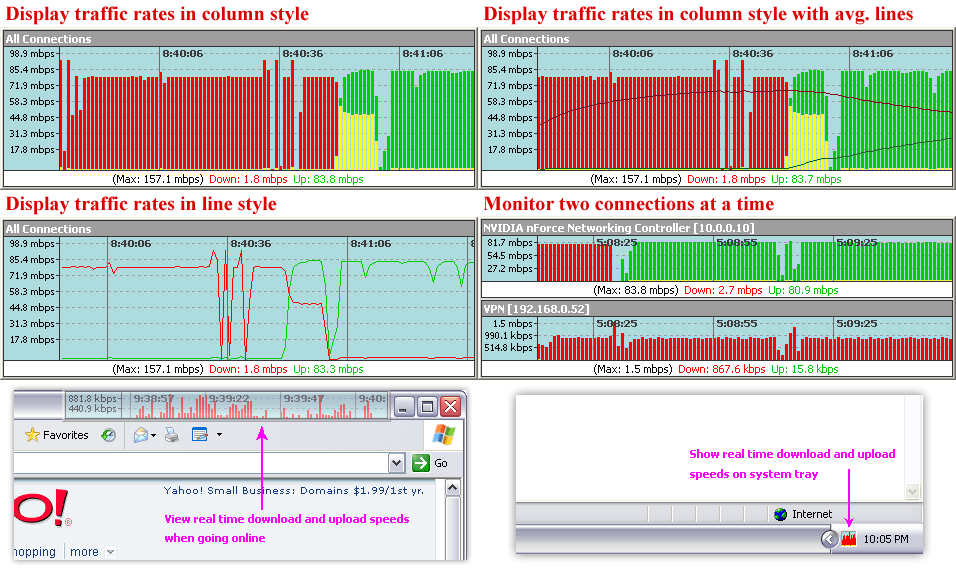
- Display real-time graphical and numerical data transfer rates
- Support multiple network connections at the same time
- Support running as a system service that monitors bandwidth
usages and generate traffic reports automatically
- Bandwidth usage notification (notify user by playing
sound, computer beep, sending email, running a program)
- Log transfer rates and provide daily, weekly, monthly, and summary traffic
report, plus export to .txt, .html, and .csv file
- Traffic stopwatch that tests bandwidth speeds
- Traffic recorder that records transfer rates and saves to plain text or Microsoft
Excel CSV file
- Work with majority network connections including phone modems,
DSL, cable modem, LAN, satellite, wireless, VPN, and more
- Rate scale that indicates traffic rates value
- Show in either KB/sec (kilobytes per second) or kbps
(kilobits per second)
- Network connection speed is customizable
- Customize colors and fonts
- Show real-time network traffic graph in system tray
- Show time in traffic graph
- Show traffic graph in line or column
style; and column width and space can be customized
- Show average download and upload lines in traffic
graph
- Include complete window configuration and view options
- Require minimal system resources (CPU, RAM, and HDD)
- Full compatible with Windows 98, Windows Me, Windows NT 4.0, Windows 2000,
Windows XP, Vista, Windows 7, Windows 8, and Windows 10
Free Download Net Meter
- Net Meter v3.6 build 437 released new
- Support multiple date formats (MM/DD/YYYY, MM.DD.YYYY, DD/MM/YYYY, DD.MM.YYYY, YYYY/MM/DD, YYYY-MM-DD, YYYY.MM.DD)
- Customize hotkey
- Show bandwidth usages over last "X" days
- Fixes bugs
- Net Meter v3.6 build 417 released
- Support running as a system service
- Notify bandwidth usage by email in service
- Record traffic rates in service
- Generate traffic reports in txt, csv, and html formats every N seconds in service
- Fixes bugs
- Net Meter v3.4 build 349 released
- Sends an notification email when exceeding bandwidth usage limit
- Runs a program when exceeding bandwidth usage limit
- Enables to set a custom days for bandwidth usage notification
- Shows real-time network traffic graph in system tray
- Shows adapter name and IP address in tray tips
- Shows time in traffic graph
- Enables to set scale and time fonts
- Enables to set colors for border, title background, title text, rate background, rate text, scale text, time grid, and time text
- Shows traffic graph in line style
- Shows average download and upload lines in traffic graph
- Enables to customize column width and space
- Enables to customize grid line style (dot/solid/dash/dashdot/dashdotdot) of scale and time
- Enables to customize time format (HH:MM:SS / HH:MM / MM:SS)
- Enables to customize time grid interval in second
- Enables to reset traffic graph
- Adds option "Enable click-through"
- Fixes bugs
- Net Meter v3.3 build 327 released
- Enables to press "F" to show main menu (equals to right-click)
- Fixes bugs
- Net Meter v3.3 build 319 released
- Adds bandwidth usage notification
- Start days of week and month are customizable
- Enhances traffic reports
- Fixes bugs
- Net Meter v3.2 build 297 released
- Full compatible with Vista
- Shows IP address in adapter title and updates in real-time
- Supports exporting traffic reports to a web page (.html, .htm file)
- Fixes bugs
- Net Meter v3.1 build 249 released
- Adds traffic rates recorder
- Adds color rates text support
- Adds customizing adapter name support
- Fixes two bugs
- Net Meter v3.0 build 239 released
- Net Meter v3.0 build 236 released
- Adds hotkey support
- Fixes bugs
- Net Meter v3.0 released
Net Meter Press Release
|



